
Recent updates have brought a wave of improvements to iPhones, from refined features to enhanced security. But amidst all the changes, a single, subtle adjustment has brought a surprising amount of relief – a fix for the Lock Screen.
For years, a simple swipe on the Lock Screen instantly launched the camera. It was designed for speed, a way to capture fleeting moments without unlocking your phone. A brilliant idea, in theory.
However, that same swift gesture became a source of constant frustration. Accidental activations were commonplace, a persistent irritation that many iPhone users silently endured.
Imagine pulling your phone from your pocket, only to discover the camera app is running, silently draining the battery. It’s a small annoyance that can quickly escalate into a significant problem, especially when power is already low.
The potential for unnoticed battery drain was a real concern. While a completely dead phone might not have been the result for everyone, the risk was always present, lurking with every accidental swipe.
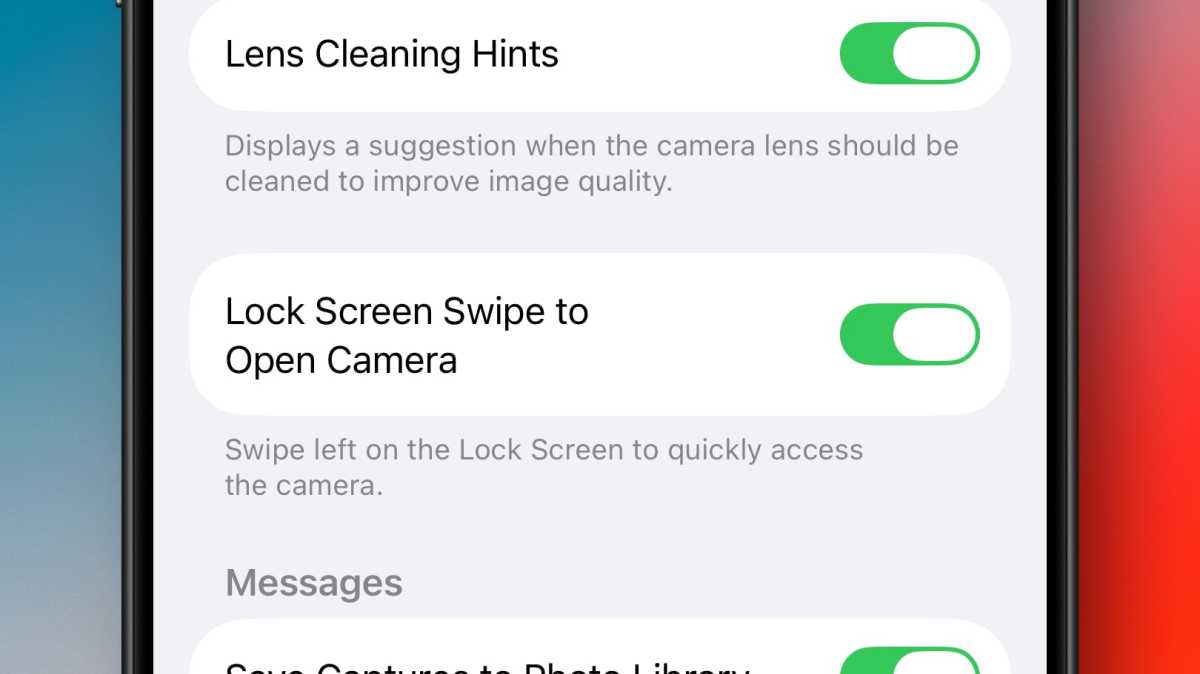
Now, thankfully, that worry is a thing of the past. A new setting within the latest iOS version allows you to disable the Lock Screen camera gesture entirely, eliminating the problem at its source.
Disabling the gesture is remarkably simple. Open the Settings app, navigate to the Camera section, and locate “Lock Screen Swipe to Open Camera.” A single tap of the toggle is all it takes.
With the gesture disabled, a swipe across the Lock Screen will no longer summon the camera. It’s a small change, but one that brings a welcome sense of control and peace of mind.
And should you ever decide you miss the convenience, the setting is easily reversed. Apple hasn’t removed the feature entirely, simply made it optional, adapting to the user’s preference.
In truth, faster and more reliable alternatives already existed. The Camera Control and a dedicated Camera app icon on the Lock Screen offer quicker access without the risk of accidental activation.
So, while some might mourn the loss of the gesture, the trade-off is well worth it. A blank Lock Screen, free from the silent drain of an unintended camera session, is a small victory that makes a surprisingly big difference.


